


Local Weather - Radar & Widget
4.19.00 Reviews
App Specs
- Version
- 2.0.0.0
- Updated On
- License
- Free
- Downloads
- 100,000+
- Developer
- Huju Network Technology CO., Ltd.
- Categories
- Weather
- Platform
- Android
Screenshots
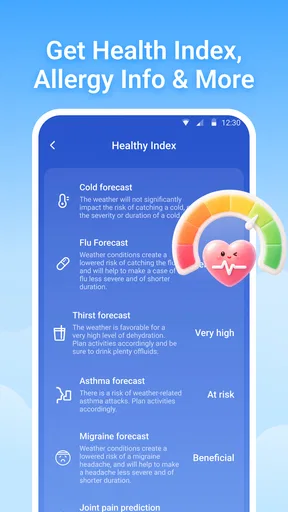
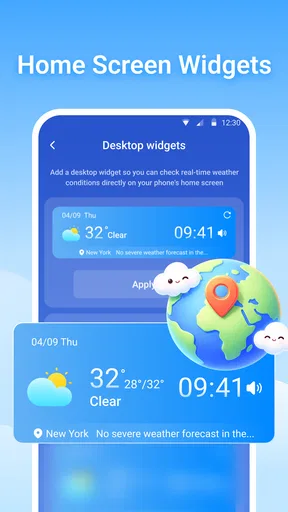
 Analysis by AppCompare
When I choose a weather app, I want more than a pleasant-looking forecast: I want to make a quick decision about a walk, a commute or an errand without digging through menus. Local Weather - Radar & Widget is built around that everyday need, combining local forecasts with a radar view and home-screen widgets. I find that mix most useful when the weather could affect what I do in the next few hours, rather than when I’m looking for a deep meteorological report.
Where the app fits in a daily routine
A practical way to use a local weather app is to check it at two different moments: once before making a plan, then again shortly before leaving. The forecast gives you a broad sense of the day, while radar can help you judge whether rain is nearby or likely to change your timing. Neither view should be treated as a guarantee, but together they can make a last-minute decision less of a guess.
For example, if I’m planning to walk to a nearby shop, I can check the hourly outlook first and then look at the radar before heading out. If rain appears to be approaching, I might take an umbrella or wait a little. That’s a more useful workflow than opening a forecast once in the morning and assuming the conditions will stay the same all day.
The widget is a good fit for people who check the weather in passing. I’d place it somewhere easy to see and use it as a prompt to open the full app when the day looks changeable. That distinction matters: a glance at the home screen is convenient, but it can’t replace looking at the detailed forecast or radar when timing is important.
Who is likely to appreciate it
I can see this being a good everyday choice for commuters, people who walk or cycle locally, and anyone who makes plans around outdoor conditions. UV information can also help when deciding how long to spend outside, while the ability to keep more than one location is handy for checking on family or looking ahead to a trip. Those are simple uses, but they give the app a place in a routine rather than making it something I open only during a storm.
It may be less suitable if you need specialist weather analysis, highly technical charts or a workflow built around professional forecasting. The features described here are aimed at making common decisions easier. If your work depends on precise, expert-level weather information, I’d choose a dedicated specialist service and treat a general local forecast as a secondary reference.
How I’d compare it with other weather apps
Many built-in weather apps are enough for checking a temperature or the chance of rain, and they can be especially convenient because they are already on the phone. Where this app’s appeal lies is in bringing radar, forecast details, alerts and a widget into one weather-focused experience. Whether that combination is better for you depends on what you actually use: if you only check the day’s high and low, a simpler default app may be all you need.
Worth Reading Before You Choose

EA SPORTS FC Mobile 26 Is a Bigger Football Game, but It Takes Time

Flipboard Shows What News Apps Must Do Beyond the Feed

Switching to Android Auto Means Rethinking Your Driving Routine

Google Calendar Makes a Crowded Week Easier to Manage

Ludo King Makes the Most of the Minutes Between Plans

Baby Panda World Brings Quick Play to Modern Phones, but Its Game Library Feels Busy
Compared with apps that focus on maps or specialist data, this one appears more approachable for regular household use. I’d use its radar to get a visual sense of nearby conditions, not as a promise that a particular street will stay dry at a particular minute. Weather forecasts can vary by location and timing, so when a decision has serious consequences, I’d check official local guidance as well as an app notification.
Small habits that make the information more useful
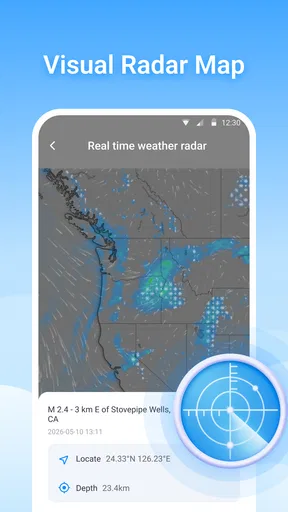
One useful habit is to compare the hourly forecast with the radar instead of relying on either alone. The forecast helps with the shape of the day; the radar adds a visual cue about current precipitation. If the two seem out of step, I’d avoid making a tight plan around a precise changeover time and check again closer to leaving.
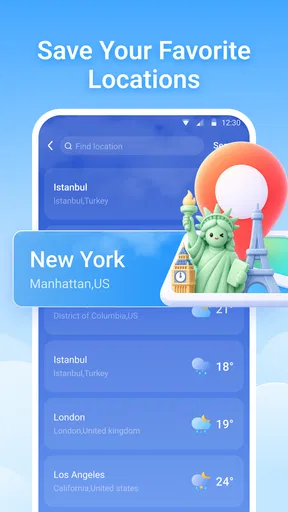
Multiple saved locations can also be more helpful when used deliberately. I’d keep the places I genuinely need to monitor, such as home and a destination, rather than filling the list with locations I rarely check. That makes it faster to find the forecast that matters and reduces the chance of acting on the wrong place. If you travel, remember to switch your attention to the destination’s forecast rather than assuming the conditions at home will tell you much about the journey.
Alerts are best treated as a backup, not as a replacement for checking conditions. I’d enable the notices that would change my plans, then make sure the phone’s notification settings allow them through. If alerts are too broad or arrive at inconvenient moments, they can become easy to ignore; a smaller set of useful notifications is more likely to help.
First Impressions and Setup
Downloading Local Weather - Radar & Widget was a breeze. It’s available for both Android and iOS, so no matter your device allegiance, you’re good to go. The app has a clean, intuitive design that doesn’t bombard you with unnecessary fluff. Right off the bat, it asks for permission to access your location, which makes sense because, well, it’s a local weather app. Once you’re past that, setting it up is as simple as pie.
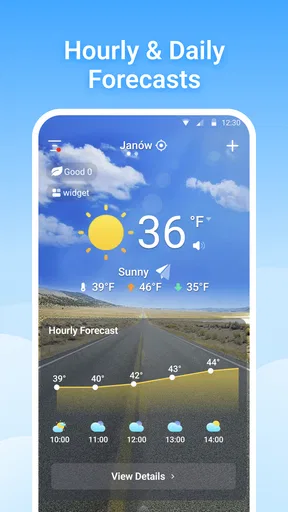
One of the first things I noticed was the customizable widgets. They come in various sizes, allowing you to pick one that fits snugly on your home screen. Having the weather at a glance without diving into the app is a neat feature, especially on those busy mornings when every second counts.
Features that Stand Out
Let’s talk features because this app is packed with them. The real-time radar is a game-changer. You can literally watch those rain clouds roll in and decide whether it’s worth risking a trip to the store without an umbrella. The radar updates frequently, so you’re always in the loop.
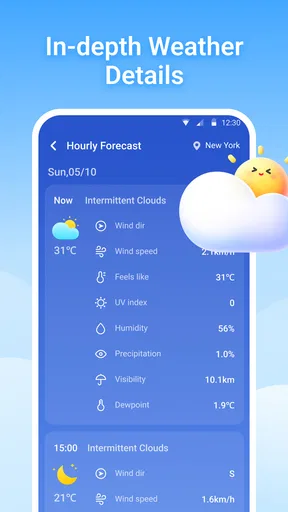
The daily and weekly forecasts are detailed yet easy to digest. I especially love the hourly breakdowns; it’s like having a personal meteorologist in your pocket. Oh, and it even includes UV index information, which is great for anyone as sun-conscious as I am.
Another cool feature is the severe weather alerts. I’ve got mine set up to notify me of any incoming storms or temperature extremes. It’s a real lifesaver, especially if you live in areas where the weather can be unpredictable.
User Experience
In terms of user experience, Local Weather - Radar & Widget scores high. The interface is smooth, and I didn’t encounter any lag or glitches, which is more than I can say for some other weather apps I’ve tried. Navigation is straightforward, and the information is laid out clearly.
I also appreciate the option to switch between different weather providers. If you’ve ever been frustrated by conflicting weather forecasts, this feature might just be your new best friend. You can compare data and choose the provider you trust the most.
Does it Live Up to the Hype?
So, is it worth the download? In my opinion, absolutely. I’ve found Local Weather - Radar & Widget to be incredibly reliable and user-friendly. The real-time updates and detailed forecasts have kept me dry and prepared more times than I can count.
The app also offers some personalization options, like changing the theme and units. It’s a small touch, but it makes the app feel more tailored to my preferences. Plus, the ability to save multiple locations is perfect for keeping tabs on the weather in different places, whether it's for travel plans or checking in on family.
What the release details tell me
The current version is 1.3.0.0, and the app was released on April 14, 2026. That gives me a useful point of reference for judging its present state, but a version number alone doesn’t tell me which features changed or how they changed. I wouldn’t assume that the radar, alerts or widgets are new additions simply from the release information. For someone already using it, the practical question is whether the current experience suits their routine, not whether the version number sounds recent.
Huju Network Technology CO., Ltd. is the developer. The app is free, carries an Everyone age rating, and has over 100,000 installs. Its average rating is 4.3 from around 418 ratings, while the review count is small. I’d take that as a useful indication that people are trying it, not as proof that it will behave equally well in every location or suit every forecasting preference.
Questions worth settling before you rely on it
If you’re wondering whether location access is essential, it is the straightforward way to get a local forecast. If you prefer not to share your device’s location, check whether entering or saving a place manually works for your needs before making the app part of your routine. For travel planning, saved locations are useful, but I’d still verify that the selected place is the one you intend to check.
If you’re deciding whether alerts are dependable enough to plan around, I’d use them as a prompt to check the forecast rather than as the sole warning system. That’s especially important for severe conditions: keep official local alerts in view when safety is involved. For ordinary choices such as carrying a raincoat, the app’s combination of hourly details and radar is more appropriate.
Another fair question is whether this can replace a default weather app. It can if you value the radar, widgets and provider choices enough to open a separate app. If all you need is a quick temperature check, the built-in option may remain the faster choice. I’d also test the widget on your own home screen before deciding; the right size and layout are personal, and a widget only saves time if the information is readable at a glance.
What I’d watch as it develops
For existing users, the most meaningful future improvements would be the ones that make forecast changes easier to understand: clearer context for radar timing, dependable location selection and alerts that are easy to tailor. Those are areas I would watch for, not claims about what the app currently offers or promises to add. In the meantime, comparing providers can help when forecasts disagree, but it is worth remembering that different sources may interpret conditions differently rather than one automatically being correct.
My main reservation is that the feature set can encourage confidence beyond what any forecast deserves. Radar is a helpful visual tool, but it is not a street-level guarantee, and a changing forecast can still disrupt a carefully timed plan. I’d avoid relying on a single screen for outdoor events where conditions matter a great deal, and I’d check again as the event approaches.
Overall, whether you’re a weather enthusiast or just someone who wants to avoid getting caught in the rain, this app is a solid choice. It’s packed with features, easy to use, and most importantly, keeps you informed. Give it a try and see how it changes your daily routine. Trust me, you won’t regret it.
Pros
- Accurate local weather forecasts.
- Customizable weather widgets.
- Real-time radar updates.
- User-friendly interface design.
- Detailed weather alerts.
Cons
- Contains in-app advertisements.
- Limited free features.
- Requires internet for updates.
- Occasional UI lag on older devices.
- Battery consumption could be improved.
FAQs for Local Weather - Radar & Widget
What features does Local Weather - Radar & Widget offer?
Local Weather - Radar & Widget provides real-time weather updates, detailed radar maps, and customizable widgets for your home screen. It offers forecasts up to 10 days ahead, severe weather alerts, and detailed metrics such as wind speed, humidity, and UV index. This app is designed to keep you informed about any weather changes in your area.
How accurate is the weather data provided by Local Weather - Radar & Widget?
The app uses data from reliable meteorological sources to ensure accuracy. It updates in real-time to provide current weather conditions. Users have reported high levels of satisfaction with its precision, especially for local forecasts. However, like any weather app, occasional discrepancies may occur due to sudden weather changes.
Is Local Weather - Radar & Widget free to use?
Yes, Local Weather - Radar & Widget offers a free version with basic features. However, there is also a premium version available, which includes additional features such as ad-free usage, advanced radar options, and extended forecast details. The premium version can be accessed through a subscription model.
How can I customize the widget on my home screen?
The app allows you to customize the widget by choosing different styles and sizes that suit your preferences. You can select specific weather details to display, such as temperature, wind speed, or a weekly forecast. Customization options are accessible through the app’s settings, providing flexibility to suit your needs.
Does Local Weather - Radar & Widget offer international weather forecasts?
Yes, Local Weather - Radar & Widget provides weather information for locations worldwide. Whether you're traveling or simply curious about the weather in another country, the app delivers forecasts and radar maps for various international locations, ensuring you stay updated no matter where you are.


